Iceberg catalog
An Iceberg catalog is a type of external catalog that is supported by StarRocks from v2.4 onwards. With Iceberg catalogs, you can:
- Directly query data stored in Iceberg without the need to manually create tables.
- Use INSERT INTO or asynchronous materialized views (which are supported from v2.5 onwards) to process data stored in Iceberg and load the data into StarRocks.
- Perform operations on StarRocks to create or drop Iceberg databases and tables, or sink data from StarRocks tables to Parquet-formatted Iceberg tables by using INSERT INTO (this feature is supported from v3.1 onwards).
To ensure successful SQL workloads on your Iceberg cluster, your StarRocks cluster must be able to access the storage system and metastore of your Iceberg cluster. StarRocks supports the following storage systems and metastores:
-
Distributed file system (HDFS) or object storage like AWS S3, Microsoft Azure Storage, Google GCS, or other S3-compatible storage system (for example, MinIO)
-
Metastore like Hive metastore, AWS Glue, or Tabular
- If you choose AWS S3 as storage, you can use HMS or AWS Glue as metastore. If you choose any other storage system, you can only use HMS as metastore.
- If you choose Tabular as metastore, you need to use the Iceberg REST catalog.
Usage notes
Take note of the following points when you use StarRocks to query data from Iceberg:
| File format | Compression format | Iceberg table version |
|---|---|---|
| Parquet | SNAPPY, LZ4, ZSTD, GZIP, and NO_COMPRESSION |
|
| ORC | ZLIB, SNAPPY, LZO, LZ4, ZSTD, and NO_COMPRESSION |
|
Integration preparation
Before you create an Iceberg catalog, make sure your StarRocks cluster can integrate with the storage system and metastore of your Iceberg cluster.
Storage
Select the tab that matches your storage type:
- AWS S3
- HDFS
If your Iceberg cluster uses AWS S3 as storage or AWS Glue as metastore, choose your suitable authentication method and make the required preparations to ensure that your StarRocks cluster can access the related AWS cloud resources.
The following authentication methods are recommended:
- Instance profile
- Assumed role
- IAM user
Of the above-mentioned three authentication methods, instance profile is the most widely used.
For more information, see Preparation for authentication in AWS IAM.
If you choose HDFS as storage, configure your StarRocks cluster as follows:
-
(Optional) Set the username that is used to access your HDFS cluster and Hive metastore. By default, StarRocks uses the username of the FE and BE or CN processes to access your HDFS cluster and Hive metastore. You can also set the username by adding
export HADOOP_USER_NAME="<user_name>"at the beginning of the fe/conf/hadoop_env.sh file of each FE and at the beginning of the be/conf/hadoop_env.sh file of each BE or the cn/conf/hadoop_env.sh file of each CN. After you set the username in these files, restart each FE and each BE or CN to make the parameter settings take effect. You can set only one username for each StarRocks cluster. -
When you query Iceberg data, the FEs and BEs or CNs of your StarRocks cluster use the HDFS client to access your HDFS cluster. In most cases, you do not need to configure your StarRocks cluster to achieve that purpose, and StarRocks starts the HDFS client using the default configurations. You need to configure your StarRocks cluster only in the following situations:
- High availability (HA) is enabled for your HDFS cluster: Add the hdfs-site.xml file of your HDFS cluster to the $FE_HOME/conf path of each FE and to the $BE_HOME/conf path of each BE or the $CN_HOME/conf path of each CN.
- View File System (ViewFs) is enabled for your HDFS cluster: Add the core-site.xml file of your HDFS cluster to the $FE_HOME/conf path of each FE and to the $BE_HOME/conf path of each BE or the $CN_HOME/conf path of each CN.
If an error indicating an unknown host is returned when you send a query, you must add the mapping between the host names and IP addresses of your HDFS cluster nodes to the /etc/hosts path.
Kerberos authentication
If Kerberos authentication is enabled for your HDFS cluster or Hive metastore, configure your StarRocks cluster as follows:
- Run the
kinit -kt keytab_path principalcommand on each FE and each BE or CN to obtain Ticket Granting Ticket (TGT) from Key Distribution Center (KDC). To run this command, you must have the permissions to access your HDFS cluster and Hive metastore. Note that accessing KDC with this command is time-sensitive. Therefore, you need to use cron to run this command periodically. - Add
JAVA_OPTS="-Djava.security.krb5.conf=/etc/krb5.conf"to the $FE_HOME/conf/fe.conf file of each FE and to the $BE_HOME/conf/be.conf file of each BE or the $CN_HOME/conf/cn.conf file of each CN. In this example,/etc/krb5.confis the save path of the krb5.conf file. You can modify the path based on your needs.
Create an Iceberg catalog
Syntax
CREATE EXTERNAL CATALOG <catalog_name>
[COMMENT <comment>]
PROPERTIES
(
    "type" = "iceberg",
    [SecurityParams],
    MetastoreParams,
    StorageCredentialParams,
    MetadataRelatedParams
)
Parameters
catalog_name
The name of the Iceberg catalog. The naming conventions are as follows:
- The name can contain letters, digits (0-9), and underscores (_). It must start with a letter.
- The name is case-sensitive and cannot exceed 1023 characters in length.
comment
The description of the Iceberg catalog. This parameter is optional.
type
The type of your data source. Set the value to iceberg.
SecurityParams
Parameter(s) about how StarRocks manages data access to the catalog.
catalog.access.control
The data access control policy. Valid values:
native(Default): The StarRocks built-in data access control system is used.allowall: All data access checks are delegated to the Catalog itself.ranger: Data access checks are delegated to Apache Ranger.
MetastoreParams
A set of parameters about how StarRocks integrates with the metastore of your data source. Choose the tab that matches your metastore type:
- Hive metastore
- AWS Glue
- REST
- JDBC
Hive metastore
If you choose Hive metastore as the metastore of your data source, configure MetastoreParams as follows:
"iceberg.catalog.type" = "hive",
"hive.metastore.uris" = "<hive_metastore_uri>"
Before querying Iceberg data, you must add the mapping between the host names and IP addresses of your Hive metastore nodes to the /etc/hosts path. Otherwise, StarRocks may fail to access your Hive metastore when you start a query.
The following table describes the parameter you need to configure in MetastoreParams.
-
iceberg.catalog.type- Required: Yes
- Description: The type of metastore that you use for your Iceberg cluster. Set the value to
hive.
-
hive.metastore.uris- Required: Yes
- Description: The URI of your Hive metastore. Format:
thrift://<metastore_IP_address>:<metastore_port>.
If high availability (HA) is enabled for your Hive metastore, you can specify multiple metastore URIs and separate them with commas (,), for example,"thrift://<metastore_IP_address_1>:<metastore_port_1>,thrift://<metastore_IP_address_2>:<metastore_port_2>,thrift://<metastore_IP_address_3>:<metastore_port_3>".
AWS Glue
If you choose AWS Glue as the metastore of your data source, which is supported only when you choose AWS S3 as storage, take one of the following actions:
-
To choose the instance profile-based authentication method, configure
MetastoreParamsas follows:"iceberg.catalog.type" = "glue",
"aws.glue.use_instance_profile" = "true",
"aws.glue.region" = "<aws_glue_region>" -
To choose the assumed role-based authentication method, configure
MetastoreParamsas follows:"iceberg.catalog.type" = "glue",
"aws.glue.use_instance_profile" = "true",
"aws.glue.iam_role_arn" = "<iam_role_arn>",
"aws.glue.region" = "<aws_glue_region>" -
To choose the IAM user-based authentication method, configure
MetastoreParamsas follows:"iceberg.catalog.type" = "glue",
"aws.glue.use_instance_profile" = "false",
"aws.glue.access_key" = "<iam_user_access_key>",
"aws.glue.secret_key" = "<iam_user_secret_key>",
"aws.glue.region" = "<aws_s3_region>"
MetastoreParams for AWS Glue:
-
iceberg.catalog.type- Required: Yes
- Description: The type of metastore that you use for your Iceberg cluster. Set the value to
glue.
-
aws.glue.use_instance_profile- Required: Yes
- Description: Specifies whether to enable the instance profile-based authentication method and the assumed role-based authentication method. Valid values:
trueandfalse. Default value:false.
-
aws.glue.iam_role_arn- Required: No
- Description: The ARN of the IAM role that has privileges on your AWS Glue Data Catalog. If you use the assumed role-based authentication method to access AWS Glue, you must specify this parameter.
-
aws.glue.region- Required: Yes
- Description: The region in which your AWS Glue Data Catalog resides. Example:
us-west-1.
-
aws.glue.access_key- Required: No
- Description: The access key of your AWS IAM user. If you use the IAM user-based authentication method to access AWS Glue, you must specify this parameter.
-
aws.glue.secret_key- Required: No
- Description: The secret key of your AWS IAM user. If you use the IAM user-based authentication method to access AWS Glue, you must specify this parameter.
-
aws.glue.catalog_id- Required: No
- Description: The ID of the AWS Glue Data Catalog to use. When not specified, the catalog in the current AWS account is used. You must specify this parameter when you need to access a Glue Data Catalog in a different AWS account (cross-account access).
For information about how to choose an authentication method for accessing AWS Glue and how to configure an access control policy in the AWS IAM Console, see Authentication parameters for accessing AWS Glue.
REST
For detailed instructions on creating an Iceberg REST catalog for S3 tables, see Create Iceberg REST Catalog for AWS S3 tables.
If you use REST as metastore, you must specify the metastore type as REST ("iceberg.catalog.type" = "rest"). Configure MetastoreParams as follows:
"iceberg.catalog.type" = "rest",
"iceberg.catalog.uri" = "<rest_server_api_endpoint>",
"iceberg.catalog.security" = "oauth2",
"iceberg.catalog.oauth2.credential" = "<credential>",
"iceberg.catalog.warehouse" = "<identifier_or_path_to_warehouse>"
MetastoreParams for REST catalog:
-
iceberg.catalog.type- Required: Yes
- Description: The type of metastore that you use for your Iceberg cluster. Set the value to
rest. -
-
iceberg.catalog.uri- Required: Yes
- Description: The URI of the REST service endpoint. Example:
https://api.tabular.io/ws. -
-
iceberg.catalog.view-endpoints-supported- Required: No
- Description: Whether to use the view endpoints to support view-related operations when the REST service of earlier versions that does not return endpoints in
CatalogConfig. This parameter is used for backwards compatibility with REST servers of early versions. Default:false.
-
iceberg.catalog.security- Required: No
- Description: The type of authorization protocol to use. Default:
NONE. Valid value:OAUTH2, which requires either atokenorcredential.
-
iceberg.catalog.oauth2.token- Required: No
- Description: The bearer token used for interactions with the server. A
tokenorcredentialis required forOAUTH2authorization protocol. Example:AbCdEf123456.
-
iceberg.catalog.oauth2.credential- Required: No
- Description: The credential to exchange for a token in the OAuth2 client credentials flow with the server. A
tokenorcredentialis required forOAUTH2authorization protocol. Example:AbCdEf123456.
-
iceberg.catalog.oauth2.scope- Required: No
- Description: Scope to be used when communicating with the REST Catalog. Applicable only when
credentialis used.
-
iceberg.catalog.oauth2.server-uri- Required: No
- Description: The endpoint to retrieve access token from OAuth2 Server.
-
iceberg.catalog.vended-credentials-enabled- Required: No
- Description: Whether to use credentials provided by REST backend for file system access. Default:
true.
-
iceberg.catalog.warehouse- Required: No
- Description: The warehouse location or identifier of the Iceberg catalog. Example:
s3://my_bucket/warehouse_locationorsandbox. -
-
iceberg.catalog.rest.nested-namespace-enabled- Required: No
- Description: Whether to support querying objects under nested namespace. Default:
false.
The following example creates an Iceberg catalog named tabular that uses Tabular as metastore:
CREATE EXTERNAL CATALOG tabular
PROPERTIES
(
    "type" = "iceberg",
    "iceberg.catalog.type" = "rest",
    "iceberg.catalog.uri" = "https://api.tabular.io/ws",
    "iceberg.catalog.oauth2.credential" = "t-5Ii8e3FIbT9m0:aaaa-3bbbbbbbbbbbbbbbbbbb",
    "iceberg.catalog.warehouse" = "sandbox"
);
The following example creates an Iceberg catalog named smith_polaris that uses Polaris as metastore:
CREATE EXTERNAL CATALOG smith_polaris
PROPERTIES (
    "iceberg.catalog.uri"  = "http://xxx.xx.xx.xxx:8181/api/catalog",
    "type"  =  "iceberg",
    "iceberg.catalog.type"  =  "rest",
    "iceberg.catalog.warehouse" = "starrocks_catalog",
    "iceberg.catalog.security" = "oauth2",
    "iceberg.catalog.oauth2.credential" = "xxxxxxxxxxxxxxxxxxxxxxxxxxxxxxxxxxxx",
    "iceberg.catalog.oauth2.scope"='PRINCIPAL_ROLE:ALL'
 );

# `ns1.ns2.tpch_namespace` is a nested namespace
create table smith_polaris.`ns1.ns2.tpch_namespace`.tbl (c1 string);

mysql> select * from smith_polaris.`ns1.ns2.tpch_namespace`.tbl;
+------+
| c1   |
+------+
| 1    |
| 2    |
| 3    |
+------+
3 rows in set (0.34 sec)
The following example creates an Iceberg catalog named r2 that uses Cloudflare R2 Data Catalog as metastore:
CREATE EXTERNAL CATALOG r2
PROPERTIES
(
    "type" = "iceberg",
    "iceberg.catalog.type" = "rest",
    "iceberg.catalog.uri" = "<r2_catalog_uri>",
    "iceberg.catalog.security" = "oauth2",
    "iceberg.catalog.oauth2.token" = "<r2_api_token>",
    "iceberg.catalog.warehouse" = "<r2_warehouse_name>"
);

SET CATALOG r2;

CREATE DATABASE testdb;

SHOW DATABASES FROM r2;

+--------------------+
| Database           |
+--------------------+
| information_schema |
| testdb             |
+--------------------+
2 rows in set (0.66 sec)
The <r2_warehouse_name>,<r2_api_token>, and <r2_catalog_uri> values are obtained from the Cloudflare Dashboard as detailed here.
JDBC
If you choose JDBC as the metastore of your data source, configure MetastoreParams as follows:
"iceberg.catalog.type" = "jdbc",
"iceberg.catalog.uri" = "<jdbc_uri>",
"iceberg.catalog.warehouse" = "<warehouse_location>"
The following table describes the parameter you need to configure in MetastoreParams.
-
iceberg.catalog.type- Required: Yes
- Description: The type of metastore that you use for your Iceberg cluster. Set the value to
jdbc.
-
iceberg.catalog.uri- Required: Yes
- Description: The URI of your database. Format:
jdbc:[mysql\|postgresql]://<DB_IP_address>:<DB_PORT>/<DB_NAME>.
-
iceberg.catalog.warehouse- Required: Yes
- Description: The warehouse location or identifier of the Iceberg catalog. Example:
s3://my_bucket/warehouse_location.
-
iceberg.catalog.jdbc.user- Required: No
- Description: The username for the database.
-
iceberg.catalog.jdbc.password- Required: No
- Description: The password for the database.
-
iceberg.catalog.jdbc.init-catalog-tables- Required: No
- Description: Whether to create the tables
iceberg_namespace_propertiesandiceberg_tablesfor storing metadata in the database specified byiceberg.catalog.uri. The default value isfalse. Specifytrueif these two tables have not yet been created in the database specified byiceberg.catalog.uri.
The following example creates an Iceberg catalog named iceberg_jdbc and uses JDBC as metastore:
CREATE EXTERNAL CATALOG iceberg_jdbc
PROPERTIES
(
    "type" = "iceberg",
    "iceberg.catalog.type" = "jdbc",
    "iceberg.catalog.warehouse" = "s3://my_bucket/warehouse_location",
    "iceberg.catalog.uri" = "jdbc:mysql://ip:port/db_name",
    "iceberg.catalog.jdbc.user" = "username",
    "iceberg.catalog.jdbc.password" = "password",
    "aws.s3.endpoint" = "<s3_endpoint>",
    "aws.s3.access_key" = "<iam_user_access_key>",
    "aws.s3.secret_key" = "<iam_user_secret_key>"
);
If using MySQL or other custom JDBC drivers, the corresponding JAR files need to be placed in the fe/lib and be/lib/jni-packages directories.
StorageCredentialParams
A set of parameters about how StarRocks integrates with your storage system. This parameter set is optional.
Note the following points:
-
If you use HDFS as storage, you do not need to configure
StorageCredentialParamsand can skip this section. If you use AWS S3, other S3-compatible storage system, Microsoft Azure Storage, or Google GCS as storage, you must configureStorageCredentialParams. -
If you use Tabular as metastore, you do not need to configure
StorageCredentialParamsand can skip this section. If you use HMS or AWS Glue as metastore, you must configureStorageCredentialParams.
Choose the tab that matches your storage type:
- AWS S3
- HDFS
- MinIO
- Microsoft Azure Blob Storage
- Google GCS
AWS S3
If you choose AWS S3 as storage for your Iceberg cluster, take one of the following actions:
-
To choose the instance profile-based authentication method, configure
StorageCredentialParamsas follows:"aws.s3.use_instance_profile" = "true",
"aws.s3.region" = "<aws_s3_region>" -
To choose the assumed role-based authentication method, configure
StorageCredentialParamsas follows:"aws.s3.use_instance_profile" = "true",
"aws.s3.iam_role_arn" = "<iam_role_arn>",
"aws.s3.region" = "<aws_s3_region>" -
To choose the IAM user-based authentication method, configure
StorageCredentialParamsas follows:"aws.s3.use_instance_profile" = "false",
"aws.s3.access_key" = "<iam_user_access_key>",
"aws.s3.secret_key" = "<iam_user_secret_key>",
"aws.s3.region" = "<aws_s3_region>"
StorageCredentialParams for AWS S3:
aws.s3.use_instance_profile
Required: Yes
Description: Specifies whether to enable the instance profile-based authentication method and the assumed role-based authentication method. Valid values: true and false. Default value: false.
aws.s3.iam_role_arn
Required: No Description: The ARN of the IAM role that has privileges on your AWS S3 bucket. If you use the assumed role-based authentication method to access AWS S3, you must specify this parameter.
aws.s3.region
Required: Yes
Description: The region in which your AWS S3 bucket resides. Example: us-west-1.
aws.s3.access_key
Required: No Description: The access key of your IAM user. If you use the IAM user-based authentication method to access AWS S3, you must specify this parameter.
aws.s3.secret_key
Required: No Description: The secret key of your IAM user. If you use the IAM user-based authentication method to access AWS S3, you must specify this parameter.
For information about how to choose an authentication method for accessing AWS S3 and how to configure an access control policy in AWS IAM Console, see Authentication parameters for accessing AWS S3.
When using HDFS storage skip the storage credentials.
S3-compatible storage system
Iceberg catalogs support S3-compatible storage systems from v2.5 onwards.
If you choose an S3-compatible storage system, such as MinIO, as storage for your Iceberg cluster, configure StorageCredentialParams as follows to ensure a successful integration:
"aws.s3.enable_ssl" = "false",
"aws.s3.enable_path_style_access" = "true",
"aws.s3.endpoint" = "<s3_endpoint>",
"aws.s3.access_key" = "<iam_user_access_key>",
"aws.s3.secret_key" = "<iam_user_secret_key>"
StorageCredentialParams for MinIO and other S3 compatible systems:
aws.s3.enable_ssl
Required: Yes
Description: Specifies whether to enable SSL connection.
Valid values: true and false. Default value: true.
aws.s3.enable_path_style_access
Required: Yes
Description: Specifies whether to enable path-style access.
Valid values: true and false. Default value: false. For MinIO, you must set the value to true.
Path-style URLs use the following format: https://s3.<region_code>.amazonaws.com/<bucket_name>/<key_name>. For example, if you create a bucket named DOC-EXAMPLE-BUCKET1 in the US West (Oregon) Region, and you want to access the alice.jpg object in that bucket, you can use the following path-style URL: https://s3.us-west-2.amazonaws.com/DOC-EXAMPLE-BUCKET1/alice.jpg.
aws.s3.endpoint
Required: Yes Description: The endpoint that is used to connect to your S3-compatible storage system instead of AWS S3.
aws.s3.access_key
Required: Yes Description: The access key of your IAM user.
aws.s3.secret_key
Required: Yes Description: The secret key of your IAM user.
Microsoft Azure Storage
Iceberg catalogs support Microsoft Azure Storage from v3.0 onwards.
Azure Blob Storage
If you choose Blob Storage as storage for your Iceberg cluster, take one of the following actions:
-
To choose the Shared Key authentication method, configure
StorageCredentialParamsas follows:"azure.blob.storage_account" = "<storage_account_name>",
"azure.blob.shared_key" = "<storage_account_shared_key>" -
To choose the SAS Token authentication method, configure
StorageCredentialParamsas follows:"azure.blob.storage_account" = "<storage_account_name>",
"azure.blob.container" = "<container_name>",
"azure.blob.sas_token" = "<storage_account_SAS_token>"
StorageCredentialParams for Microsoft Azure:
azure.blob.storage_account
Required: Yes Description: The username of your Blob Storage account.
azure.blob.shared_key
Required: Yes Description: The shared key of your Blob Storage account.
azure.blob.account_name
Required: Yes Description: The username of your Blob Storage account.
azure.blob.container
Required: Yes Description: The name of the blob container that stores your data.
azure.blob.sas_token
Required: Yes Description: The SAS token that is used to access your Blob Storage account.
Azure Data Lake Storage Gen1
If you choose Data Lake Storage Gen1 as storage for your Iceberg cluster, take one of the following actions:
-
To choose the Managed Service Identity authentication method, configure
StorageCredentialParamsas follows:"azure.adls1.use_managed_service_identity" = "true"
Or:
-
To choose the Service Principal authentication method, configure
StorageCredentialParamsas follows:"azure.adls1.oauth2_client_id" = "<application_client_id>",
"azure.adls1.oauth2_credential" = "<application_client_credential>",
"azure.adls1.oauth2_endpoint" = "<OAuth_2.0_authorization_endpoint_v2>"
Azure Data Lake Storage Gen2
If you choose Data Lake Storage Gen2 as storage for your Iceberg cluster, take one of the following actions:
-
To choose the Managed Identity authentication method, configure
StorageCredentialParamsas follows:"azure.adls2.oauth2_use_managed_identity" = "true",
"azure.adls2.oauth2_tenant_id" = "<service_principal_tenant_id>",
"azure.adls2.oauth2_client_id" = "<service_client_id>"Or:
-
To choose the Shared Key authentication method, configure
StorageCredentialParamsas follows:"azure.adls2.storage_account" = "<storage_account_name>",
"azure.adls2.shared_key" = "<storage_account_shared_key>"Or:
-
To choose the Service Principal authentication method, configure
StorageCredentialParamsas follows:"azure.adls2.oauth2_client_id" = "<service_client_id>",
"azure.adls2.oauth2_client_secret" = "<service_principal_client_secret>",
"azure.adls2.oauth2_client_endpoint" = "<service_principal_client_endpoint>"
Google GCS
Iceberg catalogs support Google GCS from v3.0 onwards.
If you choose Google GCS as storage for your Iceberg cluster, take one of the following actions:
-
To choose the VM-based authentication method, configure
StorageCredentialParamsas follows:"gcp.gcs.use_compute_engine_service_account" = "true" -
To choose the service account-based authentication method, configure
StorageCredentialParamsas follows:"gcp.gcs.service_account_email" = "<google_service_account_email>",
"gcp.gcs.service_account_private_key_id" = "<google_service_private_key_id>",
"gcp.gcs.service_account_private_key" = "<google_service_private_key>" -
To choose the impersonation-based authentication method, configure
StorageCredentialParamsas follows:-
Make a VM instance impersonate a service account:
"gcp.gcs.use_compute_engine_service_account" = "true",
"gcp.gcs.impersonation_service_account" = "<assumed_google_service_account_email>" -
Make a service account (temporarily named as meta service account) impersonate another service account (temporarily named as data service account):
"gcp.gcs.service_account_email" = "<google_service_account_email>",
"gcp.gcs.service_account_private_key_id" = "<meta_google_service_account_email>",
"gcp.gcs.service_account_private_key" = "<meta_google_service_account_email>",
"gcp.gcs.impersonation_service_account" = "<data_google_service_account_email>"
-
StorageCredentialParams for Google GCS:
gcp.gcs.service_account_email
Default value: "" Example: "user@hello.iam.gserviceaccount.com" Description: The email address in the JSON file generated at the creation of the service account.
gcp.gcs.service_account_private_key_id
Default value: "" Example: "61d257bd8479547cb3e04f0b9b6b9ca07af3b7ea" Description: The private key ID in the JSON file generated at the creation of the service account.
gcp.gcs.service_account_private_key
Default value: ""
Example: "-----BEGIN PRIVATE KEY----xxxx-----END PRIVATE KEY-----\n"
Description: The private key in the JSON file generated at the creation of the service account.
gcp.gcs.impersonation_service_account
Default value: ""
Example: "hello"
Description: The service account that you want to impersonate.
MetadataRelatedParams
A set of parameters about cache of the Iceberg metadata in StarRocks. This parameter set is optional.
From v3.3.3 onwards, StarRocks supports the periodic metadata refresh strategy. In most cases, you can ignore the parameters below and do not need to tune the policy parameters in it, because the default values of these parameters already provide you with performance out-of-the-box. You can adjust the Iceberg metadata parsing mode using the system variable plan_mode.
| Parameter | Default | Description |
|---|---|---|
| enable_iceberg_metadata_cache | true | Whether to cache Iceberg-related metadata, including Table Cache, Partition Name Cache, and the Data File Cache and Delete Data File Cache in Manifest. |
| iceberg_manifest_cache_with_column_statistics | false | Whether to cache the statistics of columns. |
| refresh_iceberg_manifest_min_length | 2 * 1024 * 1024 | The minimum Manifest file length that triggers a Data File Cache refresh. |
| iceberg_data_file_cache_memory_usage_ratio | 0.1 | The maximum memory usage ratio for the data file Manifest cache. Supported from v3.5.6 onwards. |
| iceberg_delete_file_cache_memory_usage_ratio | 0.1 | The maximum memory usage ratio for the delete file Manifest cache. Supported from v3.5.6 onwards. |
| iceberg_table_cache_refresh_interval_sec | 60 | The interval (in seconds) at which the asynchronous refresh of the Iceberg table cache is triggered. Supported from v3.5.7 onwards. |
Starting from v3.4, StarRocks can obtain statistics of Iceberg tables by reading Iceberg metadata through setting the following parameters, without actively triggering the collection of Iceberg table statistics.
| Parameter | Default | Description |
|---|---|---|
| enable_get_stats_from_external_metadata | false | Whether to obtain statistics from Iceberg metadata. When this item is set to true, you can further control which type of statistics to collect through the session variable enable_get_stats_from_external_metadata. |
Examples
The following examples create an Iceberg catalog named iceberg_catalog_hms or iceberg_catalog_glue, depending on the type of metastore you use, to query data from your Iceberg cluster. Chose the tab that matches your storage type:
- AWS S3
- HDFS
- MinIO
- Microsoft Azure Blob Storage
- Google GCS
AWS S3
If you choose instance profile-based credential
-
If you use Hive metastore in your Iceberg cluster, run a command like below:
CREATE EXTERNAL CATALOG iceberg_catalog_hms
PROPERTIES
(
"type" = "iceberg",
"iceberg.catalog.type" = "hive",
"hive.metastore.uris" = "thrift://xx.xx.xx.xx:9083",
"aws.s3.use_instance_profile" = "true",
"aws.s3.region" = "us-west-2"
); -
If you use AWS Glue in your Amazon EMR Iceberg cluster, run a command like below:
CREATE EXTERNAL CATALOG iceberg_catalog_glue
PROPERTIES
(
"type" = "iceberg",
"iceberg.catalog.type" = "glue",
"aws.glue.use_instance_profile" = "true",
"aws.glue.region" = "us-west-2",
"aws.s3.use_instance_profile" = "true",
"aws.s3.region" = "us-west-2"
);
If you choose assumed role-based credential
-
If you use Hive metastore in your HIceberg cluster, run a command like below:
CREATE EXTERNAL CATALOG iceberg_catalog_hms
PROPERTIES
(
"type" = "iceberg",
"iceberg.catalog.type" = "hive",
"hive.metastore.uris" = "thrift://xx.xx.xx.xx:9083",
"aws.s3.use_instance_profile" = "true",
"aws.s3.iam_role_arn" = "arn:aws:iam::081976408565:role/test_s3_role",
"aws.s3.region" = "us-west-2"
); -
If you use AWS Glue in your Amazon EMR Iceberg cluster, run a command like below:
CREATE EXTERNAL CATALOG iceberg_catalog_glue
PROPERTIES
(
"type" = "iceberg",
"iceberg.catalog.type" = "glue",
"aws.glue.use_instance_profile" = "true",
"aws.glue.iam_role_arn" = "arn:aws:iam::081976408565:role/test_glue_role",
"aws.glue.region" = "us-west-2",
"aws.s3.use_instance_profile" = "true",
"aws.s3.iam_role_arn" = "arn:aws:iam::081976408565:role/test_s3_role",
"aws.s3.region" = "us-west-2"
);
If you choose IAM user-based credential
-
If you use Hive metastore in your Iceberg cluster, run a command like below:
CREATE EXTERNAL CATALOG iceberg_catalog_hms
PROPERTIES
(
"type" = "iceberg",
"iceberg.catalog.type" = "hive",
"hive.metastore.uris" = "thrift://xx.xx.xx.xx:9083",
"aws.s3.use_instance_profile" = "false",
"aws.s3.access_key" = "<iam_user_access_key>",
"aws.s3.secret_key" = "<iam_user_access_key>",
"aws.s3.region" = "us-west-2"
); -
If you use AWS Glue in your Amazon EMR Iceberg cluster, run a command like below:
CREATE EXTERNAL CATALOG iceberg_catalog_glue
PROPERTIES
(
"type" = "iceberg",
"iceberg.catalog.type" = "glue",
"aws.glue.use_instance_profile" = "false",
"aws.glue.access_key" = "<iam_user_access_key>",
"aws.glue.secret_key" = "<iam_user_secret_key>",
"aws.glue.region" = "us-west-2",
"aws.s3.use_instance_profile" = "false",
"aws.s3.access_key" = "<iam_user_access_key>",
"aws.s3.secret_key" = "<iam_user_secret_key>",
"aws.s3.region" = "us-west-2"
);
HDFS
If you use HDFS as storage, run a command like below:
CREATE EXTERNAL CATALOG iceberg_catalog_hms
PROPERTIES
(
"type" = "iceberg",
"iceberg.catalog.type" = "hive",
"hive.metastore.uris" = "thrift://xx.xx.xx.xx:9083"
);
S3-compatible storage system
Use MinIO as an example. Run a command like below:
CREATE EXTERNAL CATALOG iceberg_catalog_hms
PROPERTIES
(
"type" = "iceberg",
"iceberg.catalog.type" = "hive",
"hive.metastore.uris" = "thrift://xx.xx.xx.xx:9083",
"aws.s3.enable_ssl" = "true",
"aws.s3.enable_path_style_access" = "true",
"aws.s3.endpoint" = "<s3_endpoint>",
"aws.s3.access_key" = "<iam_user_access_key>",
"aws.s3.secret_key" = "<iam_user_secret_key>"
);
Microsoft Azure Storage
Azure Blob Storage
-
If you choose the Shared Key authentication method, run a command like below:
CREATE EXTERNAL CATALOG iceberg_catalog_hms
PROPERTIES
(
"type" = "iceberg",
"iceberg.catalog.type" = "hive",
"hive.metastore.uris" = "thrift://xx.xx.xx.xx:9083",
"azure.blob.storage_account" = "<blob_storage_account_name>",
"azure.blob.shared_key" = "<blob_storage_account_shared_key>"
); -
If you choose the SAS Token authentication method, run a command like below:
CREATE EXTERNAL CATALOG iceberg_catalog_hms
PROPERTIES
(
"type" = "iceberg",
"iceberg.catalog.type" = "hive",
"hive.metastore.uris" = "thrift://xx.xx.xx.xx:9083",
"azure.blob.storage_account" = "<blob_storage_account_name>",
"azure.blob.container" = "<blob_container_name>",
"azure.blob.sas_token" = "<blob_storage_account_SAS_token>"
);
Azure Data Lake Storage Gen1
-
If you choose the Managed Service Identity authentication method, run a command like below:
CREATE EXTERNAL CATALOG iceberg_catalog_hms
PROPERTIES
(
"type" = "iceberg",
"iceberg.catalog.type" = "hive",
"hive.metastore.uris" = "thrift://xx.xx.xx.xx:9083",
"azure.adls1.use_managed_service_identity" = "true"
); -
If you choose the Service Principal authentication method, run a command like below:
CREATE EXTERNAL CATALOG iceberg_catalog_hms
PROPERTIES
(
"type" = "iceberg",
"iceberg.catalog.type" = "hive",
"hive.metastore.uris" = "thrift://xx.xx.xx.xx:9083",
"azure.adls1.oauth2_client_id" = "<application_client_id>",
"azure.adls1.oauth2_credential" = "<application_client_credential>",
"azure.adls1.oauth2_endpoint" = "<OAuth_2.0_authorization_endpoint_v2>"
);
Azure Data Lake Storage Gen2
-
If you choose the Managed Identity authentication method, run a command like below:
CREATE EXTERNAL CATALOG iceberg_catalog_hms
PROPERTIES
(
"type" = "iceberg",
"iceberg.catalog.type" = "hive",
"hive.metastore.uris" = "thrift://xx.xx.xx.xx:9083",
"azure.adls2.oauth2_use_managed_identity" = "true",
"azure.adls2.oauth2_tenant_id" = "<service_principal_tenant_id>",
"azure.adls2.oauth2_client_id" = "<service_client_id>"
); -
If you choose the Shared Key authentication method, run a command like below:
CREATE EXTERNAL CATALOG iceberg_catalog_hms
PROPERTIES
(
"type" = "iceberg",
"iceberg.catalog.type" = "hive",
"hive.metastore.uris" = "thrift://xx.xx.xx.xx:9083",
"azure.adls2.storage_account" = "<storage_account_name>",
"azure.adls2.shared_key" = "<shared_key>"
); -
If you choose the Service Principal authentication method, run a command like below:
CREATE EXTERNAL CATALOG iceberg_catalog_hms
PROPERTIES
(
"type" = "iceberg",
"iceberg.catalog.type" = "hive",
"hive.metastore.uris" = "thrift://xx.xx.xx.xx:9083",
"azure.adls2.oauth2_client_id" = "<service_client_id>",
"azure.adls2.oauth2_client_secret" = "<service_principal_client_secret>",
"azure.adls2.oauth2_client_endpoint" = "<service_principal_client_endpoint>"
);
Google GCS
-
If you choose the VM-based authentication method, run a command like below:
CREATE EXTERNAL CATALOG iceberg_catalog_hms
PROPERTIES
(
"type" = "iceberg",
"iceberg.catalog.type" = "hive",
"hive.metastore.uris" = "thrift://xx.xx.xx.xx:9083",
"gcp.gcs.use_compute_engine_service_account" = "true"
); -
If you choose the service account-based authentication method, run a command like below:
CREATE EXTERNAL CATALOG iceberg_catalog_hms
PROPERTIES
(
"type" = "iceberg",
"iceberg.catalog.type" = "hive",
"hive.metastore.uris" = "thrift://xx.xx.xx.xx:9083",
"gcp.gcs.service_account_email" = "<google_service_account_email>",
"gcp.gcs.service_account_private_key_id" = "<google_service_private_key_id>",
"gcp.gcs.service_account_private_key" = "<google_service_private_key>"
); -
If you choose the impersonation-based authentication method:
-
If you make a VM instance impersonate a service account, run a command like below:
CREATE EXTERNAL CATALOG iceberg_catalog_hms
PROPERTIES
(
"type" = "iceberg",
"iceberg.catalog.type" = "hive",
"hive.metastore.uris" = "thrift://xx.xx.xx.xx:9083",
"gcp.gcs.use_compute_engine_service_account" = "true",
"gcp.gcs.impersonation_service_account" = "<assumed_google_service_account_email>"
); -
If you make a service account impersonate another service account, run a command like below:
CREATE EXTERNAL CATALOG iceberg_catalog_hms
PROPERTIES
(
"type" = "iceberg",
"iceberg.catalog.type" = "hive",
"hive.metastore.uris" = "thrift://xx.xx.xx.xx:9083",
"gcp.gcs.service_account_email" = "<google_service_account_email>",
"gcp.gcs.service_account_private_key_id" = "<meta_google_service_account_email>",
"gcp.gcs.service_account_private_key" = "<meta_google_service_account_email>",
"gcp.gcs.impersonation_service_account" = "<data_google_service_account_email>"
);
-
Use your catalog
View Iceberg catalogs
You can use SHOW CATALOGS to query all catalogs in the current StarRocks cluster:
SHOW CATALOGS;
You can also use SHOW CREATE CATALOG to query the creation statement of an external catalog. The following example queries the creation statement of an Iceberg catalog named iceberg_catalog_glue:
SHOW CREATE CATALOG iceberg_catalog_glue;
Switch to an Iceberg Catalog and a database in it
You can use one of the following methods to switch to an Iceberg catalog and a database in it:
-
Use SET CATALOG to specify an Iceberg catalog in the current session, and then use USE to specify an active database:
-- Switch to a specified catalog in the current session:
SET CATALOG <catalog_name>
-- Specify the active database in the current session:
USE <db_name> -
Directly use USE to switch to an Iceberg catalog and a database in it:
USE <catalog_name>.<db_name>
Drop an Iceberg catalog
You can use DROP CATALOG to drop an external catalog.
The following example drops an Iceberg catalog named iceberg_catalog_glue:
DROP Catalog iceberg_catalog_glue;
View the schema of an Iceberg table
You can use one of the following syntaxes to view the schema of an Iceberg table:
-
View schema
DESC[RIBE] <catalog_name>.<database_name>.<table_name> -
View schema and location from the CREATE statement
SHOW CREATE TABLE <catalog_name>.<database_name>.<table_name>
Query an Iceberg table
-
Use SHOW DATABASES to view the databases in your Iceberg cluster:
SHOW DATABASES FROM <catalog_name> -
Use SELECT to query the destination table in the specified database:
SELECT count(*) FROM <table_name> LIMIT 10
Create an Iceberg database
Similar to the internal catalog of StarRocks, if you have the CREATE DATABASE privilege on an Iceberg catalog, you can use the CREATE DATABASE statement to create databases in that Iceberg catalog. This feature is supported from v3.1 onwards.
Switch to an Iceberg catalog, and then use the following statement to create an Iceberg database in that catalog:
CREATE DATABASE <database_name>
[PROPERTIES ("location" = "<prefix>://<path_to_database>/<database_name.db>/")]
You can use the location parameter to specify the file path in which you want to create the database. Both HDFS and cloud storage are supported. If you do not specify the location parameter, StarRocks creates the database in the default file path of the Iceberg catalog.
The prefix varies based on the storage system you use:
HDFS
Prefix value: hdfs
Google GCS
Prefix value: gs
Azure Blob Storage
Prefix value:
- If your storage account allows access over HTTP, the
prefixiswasb. - If your storage account allows access over HTTPS, the
prefixiswasbs.
Azure Data Lake Storage Gen1
Prefix value: adl
Azure Data Lake Storage Gen2
Prefix value:
- If your storage account allows access over HTTP, the
prefixisabfs. - If your storage account allows access over HTTPS, the
prefixisabfss.
AWS S3 or other S3-compatible storage (for example, MinIO)
Prefix value: s3
Drop an Iceberg database
Similar to the internal databases of StarRocks, if you have the DROP privilege on an Iceberg database, you can use the DROP DATABASE statement to drop that Iceberg database. This feature is supported from v3.1 onwards. You can only drop empty databases.
When you drop an Iceberg database, the database's file path on your HDFS cluster or cloud storage will not be dropped along with the database.
Switch to an Iceberg catalog, and then use the following statement to drop an Iceberg database in that catalog:
DROP DATABASE <database_name>;
Create an Iceberg table
Similar to the internal databases of StarRocks, if you have the CREATE TABLE privilege on an Iceberg database, you can use the CREATE TABLE or CREATE TABLE AS SELECT statement to create a table in that Iceberg database. This feature is supported from v3.1 onwards.
Switch to an Iceberg catalog and a database in it, and then use the following syntax to create an Iceberg table in that database.
Syntax
CREATE TABLE [IF NOT EXISTS] [database.]table_name
(column_definition1[, column_definition2, ...
partition_column_definition1,partition_column_definition2...])
[partition_desc]
[PROPERTIES ("key" = "value", ...)]
[AS SELECT query]
Parameters
column_definition
The syntax of column_definition is as follows:
col_name col_type [COMMENT 'comment']
All non-partition columns must use NULL as the default value. This means that you must specify DEFAULT "NULL" for each of the non-partition columns in the table creation statement. Additionally, partition columns must be defined following non-partition columns and cannot use NULL as the default value.
partition_desc
The syntax of partition_desc is as follows:
PARTITION BY (par_col1[, par_col2...])
Currently StarRocks only supports identity transforms, which means that StarRocks creates a partition for each unique partition value.
Partition columns must be defined following non-partition columns. Partition columns support all data types excluding FLOAT, DOUBLE, DECIMAL, and DATETIME and cannot use NULL as the default value.
PROPERTIES
You can specify the table attributes in the "key" = "value" format in PROPERTIES. See Iceberg table attributes.
The following table describes a few key properties.
location
Description: The file path in which you want to create the Iceberg table. When you use HMS as metastore, you do not need to specify the location parameter, because StarRocks will create the table in the default file path of the current Iceberg catalog. When you use AWS Glue as metastore:
- If you have specified the
locationparameter for the database in which you want to create the table, you do not need to specify thelocationparameter for the table. As such, the table defaults to the file path of the database to which it belongs. - If you have not specified the
locationfor the database in which you want to create the table, you must specify thelocationparameter for the table.
file_format
Description: The file format of the Iceberg table. Only the Parquet format is supported. Default value: parquet.
compression_codec
Description: The compression algorithm used for the Iceberg table. The supported compression algorithms are SNAPPY, GZIP, ZSTD, and LZ4. Default value: gzip. This property is deprecated in v3.2.3, since which version the compression algorithm used for sinking data to Iceberg tables is uniformly controlled by the session variable connector_sink_compression_codec.
Examples
-
Create a non-partitioned table named
unpartition_tbl. The table consists of two columns,idandscore, as shown below:CREATE TABLE unpartition_tbl
(
id int,
score double
); -
Create a partitioned table named
partition_tbl_1. The table consists of three columns,action,id, anddt, of whichidanddtare defined as partition columns, as shown below:CREATE TABLE partition_tbl_1
(
action varchar(20),
id int,
dt date
)
PARTITION BY (id,dt); -
Query an existing table named
partition_tbl_1, and create a partitioned table namedpartition_tbl_2based on the query result ofpartition_tbl_1. Forpartition_tbl_2,idanddtare defined as partition columns, as shown below:CREATE TABLE partition_tbl_2
PARTITION BY (id, dt)
AS SELECT * from employee;
Sink data to an Iceberg table
Similar to the internal tables of StarRocks, if you have the INSERT privilege on an Iceberg table, you can use the INSERT statement to sink the data of a StarRocks table to that Iceberg table (currently only Parquet-formatted Iceberg tables are supported). This feature is supported from v3.1 onwards.
Switch to an Iceberg catalog and a database in it, and then use the following syntax to sink the data of StarRocks table to a Parquet-formatted Iceberg table in that database.
Syntax
INSERT {INTO | OVERWRITE} <table_name>
[ (column_name [, ...]) ]
{ VALUES ( { expression | DEFAULT } [, ...] ) [, ...] | query }

-- If you want to sink data to specified partitions, use the following syntax:
INSERT {INTO | OVERWRITE} <table_name>
PARTITION (par_col1=<value> [, par_col2=<value>...])
{ VALUES ( { expression | DEFAULT } [, ...] ) [, ...] | query }
Partition columns do not allow NULL values. Therefore, you must make sure that no empty values are loaded into the partition columns of the Iceberg table.
Parameters
INTO
To append the data of the StarRocks table to the Iceberg table.
OVERWRITE
To overwrite the existing data of the Iceberg table with the data of the StarRocks table.
column_name
The name of the destination column to which you want to load data. You can specify one or more columns. If you specify multiple columns, separate them with commas (,). You can only specify columns that actually exist in the Iceberg table, and the destination columns that you specify must include the partition columns of the Iceberg table. The destination columns you specify are mapped one on one in sequence to the columns of the StarRocks table, regardless of what the destination column names are. If no destination columns are specified, the data is loaded into all columns of the Iceberg table. If a non-partition column of the StarRocks table cannot be mapped to any column of the Iceberg table, StarRocks writes the default value NULL to the Iceberg table column. If the INSERT statement contains a query statement whose returned column types differ from the data types of the destination columns, StarRocks performs an implicit conversion on the mismatched columns. If the conversion fails, a syntax parsing error will be returned.
expression
Expression that assigns values to the destination column.
DEFAULT
Assigns a default value to the destination column.
query
Query statement whose result will be loaded into the Iceberg table. It can be any SQL statement supported by StarRocks.
PARTITION
The partitions into which you want to load data. You must specify all partition columns of the Iceberg table in this property. The partition columns that you specify in this property can be in a different sequence than the partition columns that you have defined in the table creation statement. If you specify this property, you cannot specify the column_name property.
Examples
-
Insert three data rows into the
partition_tbl_1table:INSERT INTO partition_tbl_1
VALUES
("buy", 1, "2023-09-01"),
("sell", 2, "2023-09-02"),
("buy", 3, "2023-09-03"); -
Insert the result of a SELECT query, which contains simple computations, into the
partition_tbl_1table:INSERT INTO partition_tbl_1 (id, action, dt) SELECT 1+1, 'buy', '2023-09-03'; -
Insert the result of a SELECT query, which reads data from the
partition_tbl_1table, into the same table:INSERT INTO partition_tbl_1 SELECT 'buy', 1, date_add(dt, INTERVAL 2 DAY)
FROM partition_tbl_1
WHERE id=1; -
Insert the result of a SELECT query into the partitions that meet two conditions,
dt='2023-09-01'andid=1, of thepartition_tbl_2table:INSERT INTO partition_tbl_2 SELECT 'order', 1, '2023-09-01';Or
INSERT INTO partition_tbl_2 partition(dt='2023-09-01',id=1) SELECT 'order'; -
Overwrite all
actioncolumn values in the partitions that meet two conditions,dt='2023-09-01'andid=1, of thepartition_tbl_1table withclose:INSERT OVERWRITE partition_tbl_1 SELECT 'close', 1, '2023-09-01';Or
INSERT OVERWRITE partition_tbl_1 partition(dt='2023-09-01',id=1) SELECT 'close';
Drop an Iceberg table
Similar to the internal tables of StarRocks, if you have the DROP privilege on an Iceberg table, you can use the DROP TABLE statement to drop that Iceberg table. This feature is supported from v3.1 onwards.
When you drop an Iceberg table, the table's file path and data on your HDFS cluster or cloud storage will not be dropped along with the table.
When you forcibly drop an Iceberg table (namely, with the FORCE keyword specified in the DROP TABLE statement), the table's data on your HDFS cluster or cloud storage will be dropped along with the table, but the table's file path is retained.
Switch to an Iceberg catalog and a database in it, and then use the following statement to drop an Iceberg table in that database.
DROP TABLE <table_name> [FORCE];
Create Iceberg view
You can define Iceberg views in StarRocks or add StarRocks dialect to an existing Iceberg view. Queries against such Iceberg views support abstracting the StarRocks dialect of these views. This feature is supported from v3.5 onwards.
CREATE VIEW [IF NOT EXISTS]
[<catalog>.<database>.]<view_name>
(
    <column_name>[ COMMENT 'column comment']
    [, <column_name>[ COMMENT 'column comment'], ...]
)
[COMMENT 'view comment']
AS <query_statement>
Example
Create an Iceberg view iceberg_view1 based on an Iceberg table iceberg_table.
CREATE VIEW IF NOT EXISTS iceberg.iceberg_db.iceberg_view1 AS
SELECT k1, k2 FROM iceberg.iceberg_db.iceberg_table;
Add or modify StarRocks dialect for existing Iceberg view
If your Iceberg views are created from other systems, such as Apache Spark, meanwhile, you want to query these views from StarRocks, you can add StarRocks dialect to these views. This feature is supported from v3.5 onwards.
- You must guarantee that the essential meanings of both dialects of the view are identical. StarRocks and other systems do not guarantee the consistency among different definitions.
- You can define only one StarRocks dialect for each Iceberg view. You can change the definition of the dialect using the MODIFY clause.
ALTER VIEW
[<catalog>.<database>.]<view_name>
(
    <column_name>
    [, <column_name>]
)
{ ADD | MODIFY } DIALECT
<query_statement>
Example
- Add StarRocks dialect to an existing Iceberg view
iceberg_view2.
ALTER VIEW iceberg.iceberg_db.iceberg_view2 ADD DIALECT SELECT k1, k2 FROM iceberg.iceberg_db.iceberg_table;
- Modify StarRocks dialect for an existing Iceberg view
iceberg_view2.
ALTER VIEW iceberg.iceberg_db.iceberg_view2 MODIFY DIALECT SELECT k1, k2, k3 FROM iceberg.iceberg_db.iceberg_table;
Configure metadata caching
The metadata files of your Iceberg cluster may be stored in remote storage such as AWS S3 or HDFS. By default, StarRocks caches Iceberg metadata in memory. To accelerate queries, StarRocks adopts a two-level metadata caching mechanism, with which it can cache metadata both in memory and on disk. For each initial query, StarRocks caches their computation results. If any subsequent query that is semantically equivalent to a previous query is issued, StarRocks first attempts to retrieve the requested metadata from its caches, and it retrieves the metadata from the remote storage only when the metadata cannot be hit in its caches.
StarRocks uses the Least Recently Used (LRU) algorithm to cache and evict data. The basic rules are as follows:
- StarRocks first attempts to retrieve the requested metadata from the memory. If the metadata cannot be hit in the memory, StarRock attempts to retrieve the metadata from the disks. The metadata that StarRocks has retrieved from the disks will be loaded into the memory. If the metadata cannot be hit in the disks either, StarRock retrieves the metadata from the remote storage and caches the retrieved metadata in the memory.
- StarRocks writes the metadata evicted out of the memory into the disks, but it directly discards the metadata evicted out of the disks.
From v3.3.3 onwards, StarRocks supports the periodic metadata refresh strategy. You can adjust the Iceberg metadata caching plan using the system variable plan_mode.
FE Configurations on Iceberg metadata caching
enable_iceberg_metadata_disk_cache
- Unit: N/A
- Default value:
false - Description: Specifies whether to enable the disk cache.
iceberg_metadata_cache_disk_path
- Unit: N/A
- Default value:
StarRocksFE.STARROCKS_HOME_DIR + "/caches/iceberg" - Description: The save path of cached metadata files on disk.
iceberg_metadata_disk_cache_capacity
- Unit: Bytes
- Default value:
2147483648, equivalent to 2 GB - Description: The maximum size of cached metadata allowed on disk.
iceberg_metadata_memory_cache_capacity
- Unit: Bytes
- Default value:
536870912, equivalent to 512 MB - Description: The maximum size of cached metadata allowed in memory.
iceberg_metadata_memory_cache_expiration_seconds
- Unit: Seconds
- Default value:
86500 - Description: The amount of time after which a cache entry in memory expires counting from its last access.
iceberg_metadata_disk_cache_expiration_seconds
- Unit: Seconds
- Default value:
604800, equivalent to one week - Description: The amount of time after which a cache entry on disk expires counting from its last access.
iceberg_metadata_cache_max_entry_size
- Unit: Bytes
- Default value:
8388608, equivalent to 8 MB - Description: The maximum size of a file that can be cached. Files whose size exceeds the value of this parameter cannot be cached. If a query requests these files, StarRocks retrieves them from the remote storage.
enable_background_refresh_connector_metadata
- Unit: -
- Default value: true
- Description: Whether to enable the periodic Iceberg metadata cache refresh. After it is enabled, StarRocks polls the metastore (Hive Metastore or AWS Glue) of your Iceberg cluster, and refreshes the cached metadata of the frequently accessed Iceberg catalogs to perceive data changes.
trueindicates to enable the Iceberg metadata cache refresh, andfalseindicates to disable it.
background_refresh_metadata_interval_millis
- Unit: Millisecond
- Default value: 600000
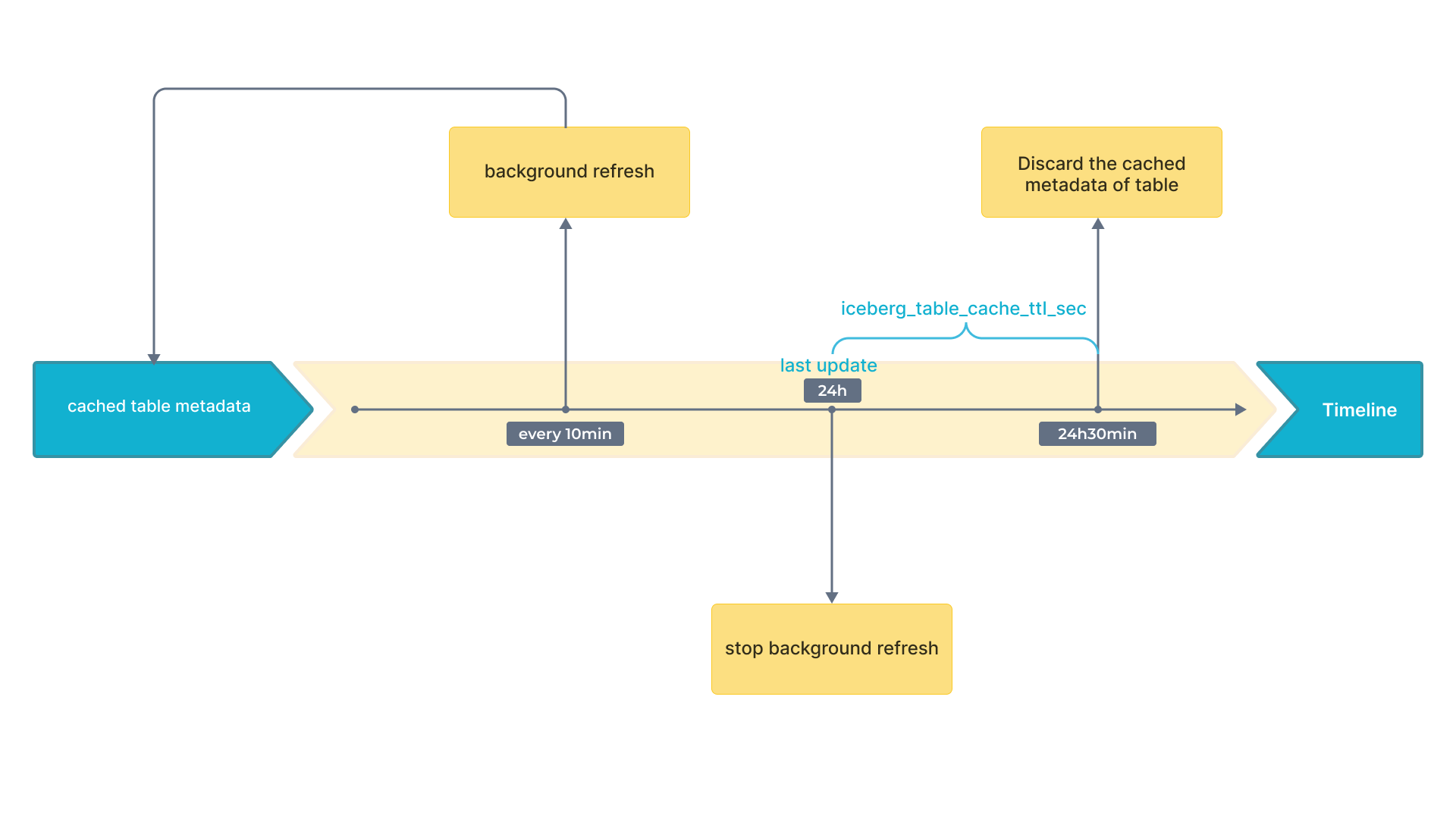
- Description: The interval between two consecutive Iceberg metadata cache refreshes. - Unit: millisecond.
background_refresh_metadata_time_secs_since_last_access_sec
- Unit: Second
- Default value: 86400
- Description: The expiration time of an Iceberg metadata cache refresh task. For the Iceberg catalog that has been accessed, if it has not been accessed for more than the specified time, StarRocks stops refreshing its cached metadata. For the Iceberg catalog that has not been accessed, StarRocks will not refresh its cached metadata.
Appendix A: Periodic Metadata Refresh Strategy
Iceberg supports snapshots. With the newest snapshot, you can get the newest result. Therefore, only cached snapshots can influence data freshness. As a result, you only need to pay attention to the refresh strategy of cache that contains snapshot.
The following flowchart shows the time intervals on a timeline.
Appendix B: Metadata File Parsing
-
Distributed Plan for Large volume of Metadata
To handle large volume of metadata effectively, StarRocks employs a distributed approach using multiple BE and CN nodes. This method leverages the parallel computing capabilities of modern query engines, which can distribute tasks such as reading, decompressing, and filtering manifest files across multiple nodes. By processing these manifest files in parallel, the time required for metadata retrieval is significantly reduced, leading to faster job planning. This is particularly beneficial for large queries involving numerous manifest files, as it eliminates single-point bottlenecks and enhances overall query execution efficiency.
-
Local Plan for Small volume of Metadata
For smaller queries, where the repeated decompression and parsing of manifest files can introduce unnecessary delays, a different strategy is employed. StarRocks caches deserialized memory objects, especially Avro files, to address this issue. By storing these deserialized files in memory, the system can bypass the decompression and parsing stages for subsequent queries. This caching mechanism allows direct access to the required metadata, significantly reducing retrieval times. As a result, the system becomes more responsive and better suited to meet high query demands and materialized view rewriting needs.
-
Adaptive Metadata Retrieval Strategy (Default)
StarRocks is designed to automatically select the appropriate metadata retrieval method based on various factors, including the number of FE and BE/CN nodes, their CPU core counts, and the number of manifest files required for the current query. This adaptive approach ensures that the system dynamically optimizes metadata retrieval without the need for manual adjustment of metadata-related parameters. By doing so, StarRocks provides a seamless experience, balancing between distributed and local plans to achieve optimal query performance under different conditions.
You can adjust the Iceberg metadata caching plan using the system variable plan_mode.